WoW: Forever addon
Forever Leveling BiS
The best gear for your level in WoW: Forever, and where to get it.
- v0.18.0
/bis- English
- 简体中文
- 繁體中文
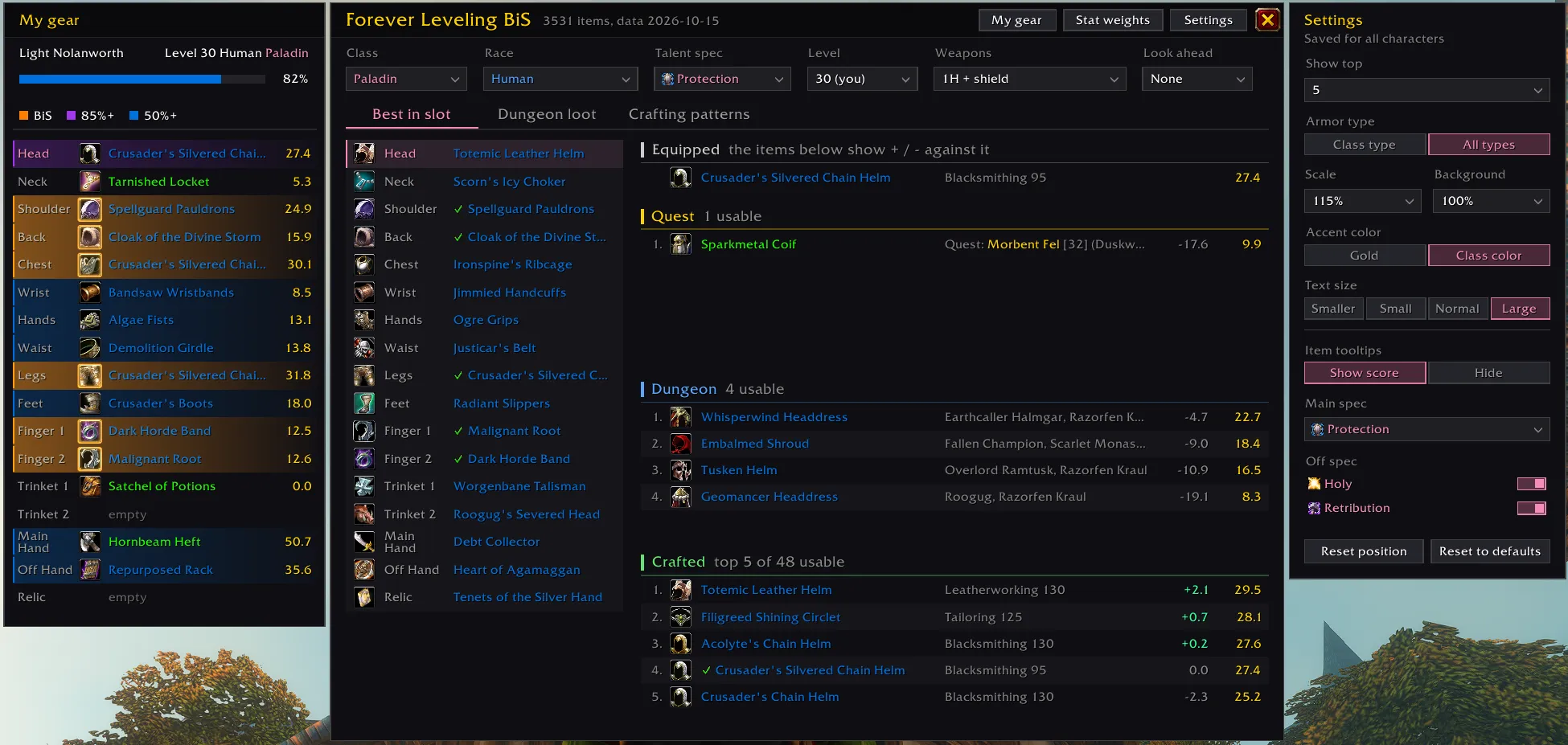
Quest rewards, dungeon drops and crafted items for every slot, ranked for your class, talent spec and level, and compared with the gear you wear.
Features
Best in slot
- The top quest, dungeon and crafted items for every slot, ranked separately
- The gain of each item over what you wear, and a check mark when you already wear the best
- Equip best puts on the best of what you carry in one click
- A green arrow on bag items that beat what you wear, in the game's bags, EllesmereUI and Baganator
- Look ahead shows upgrades unlocking over the next few levels
- Scores in every item tooltip, for your main and off spec
Dungeon loot
- Every dungeon by level, with how many upgrades it has for you
- A summary per dungeon: upgrades now, quests to pick up before you go, what's coming up
- Boss drops and quest rewards ranked for you
Crafting patterns
- Rare and epic patterns in Blacksmithing, Leatherworking, Tailoring, Engineering and Enchanting
- Where to learn each one, its cost and the skill it needs
- Which ones make an upgrade for you
Quests and map pins
- Quest giver, coordinates, chain steps and your progress, with the best reward highlighted
- Upgrades marked in the game's own quest windows and quest log
- Right-click a reward to pin your next quest giver on the map (TomTom supported)
Screenshots
Dungeon loot summary: upgrades now, quests to pick up before you go, and what is coming up 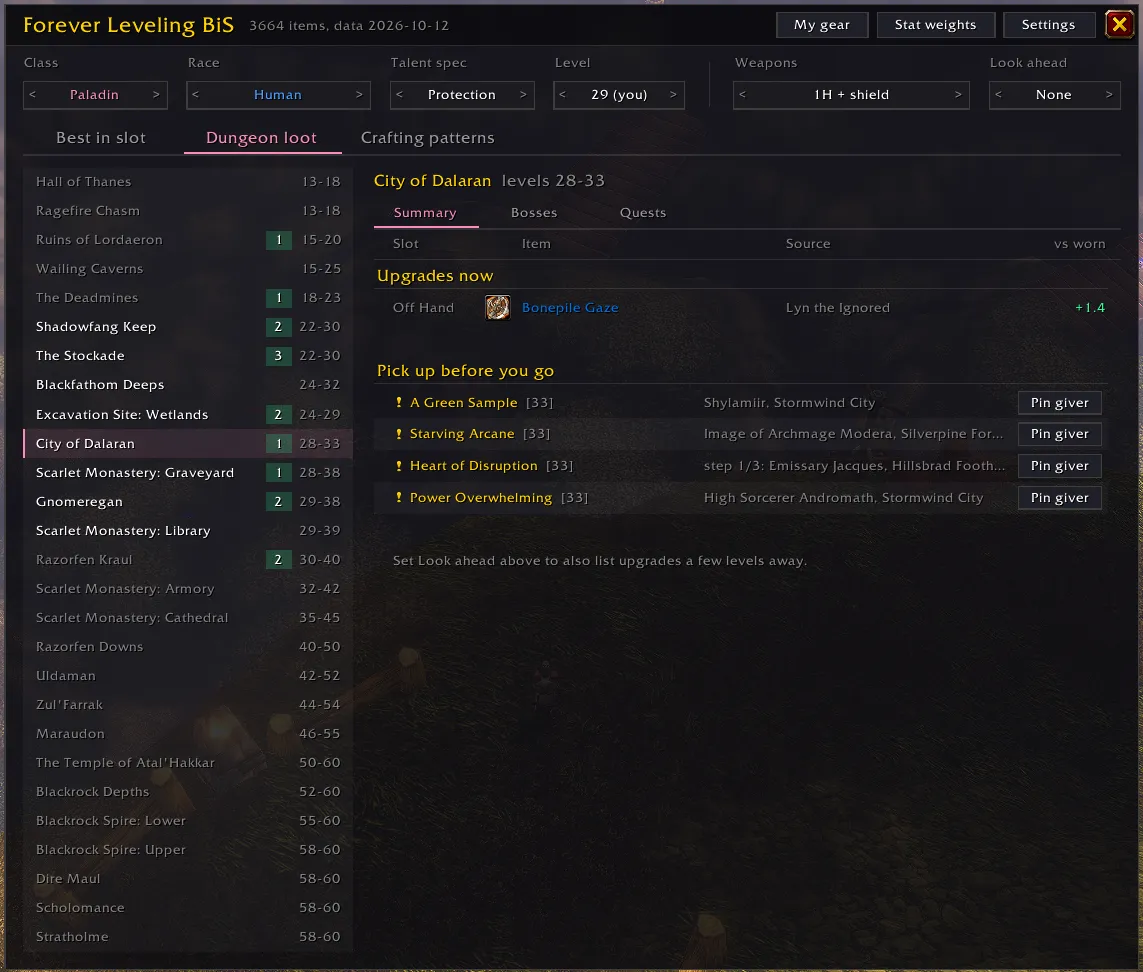
Crafting patterns, with where to learn each one and the upgrades it makes 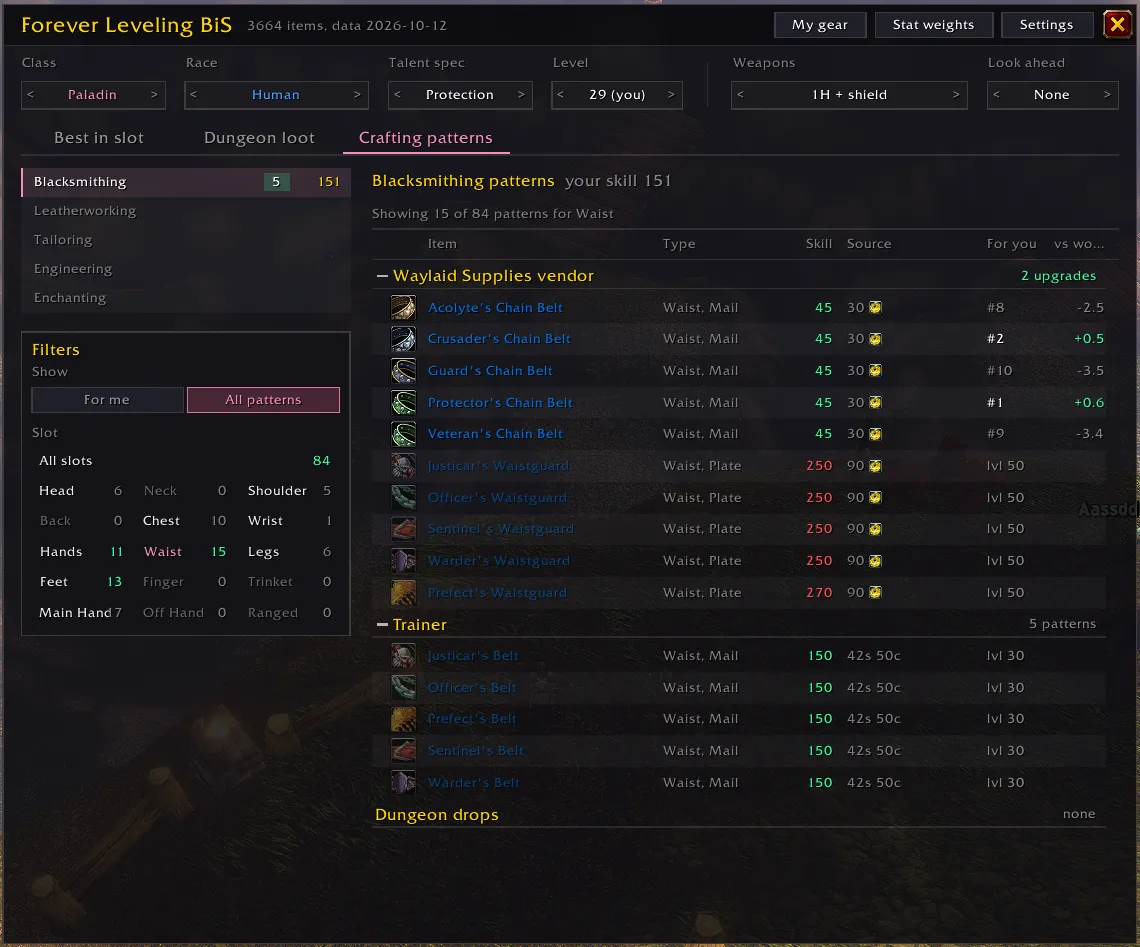
Quest panel with the quest giver, chain steps and the best reward highlighted 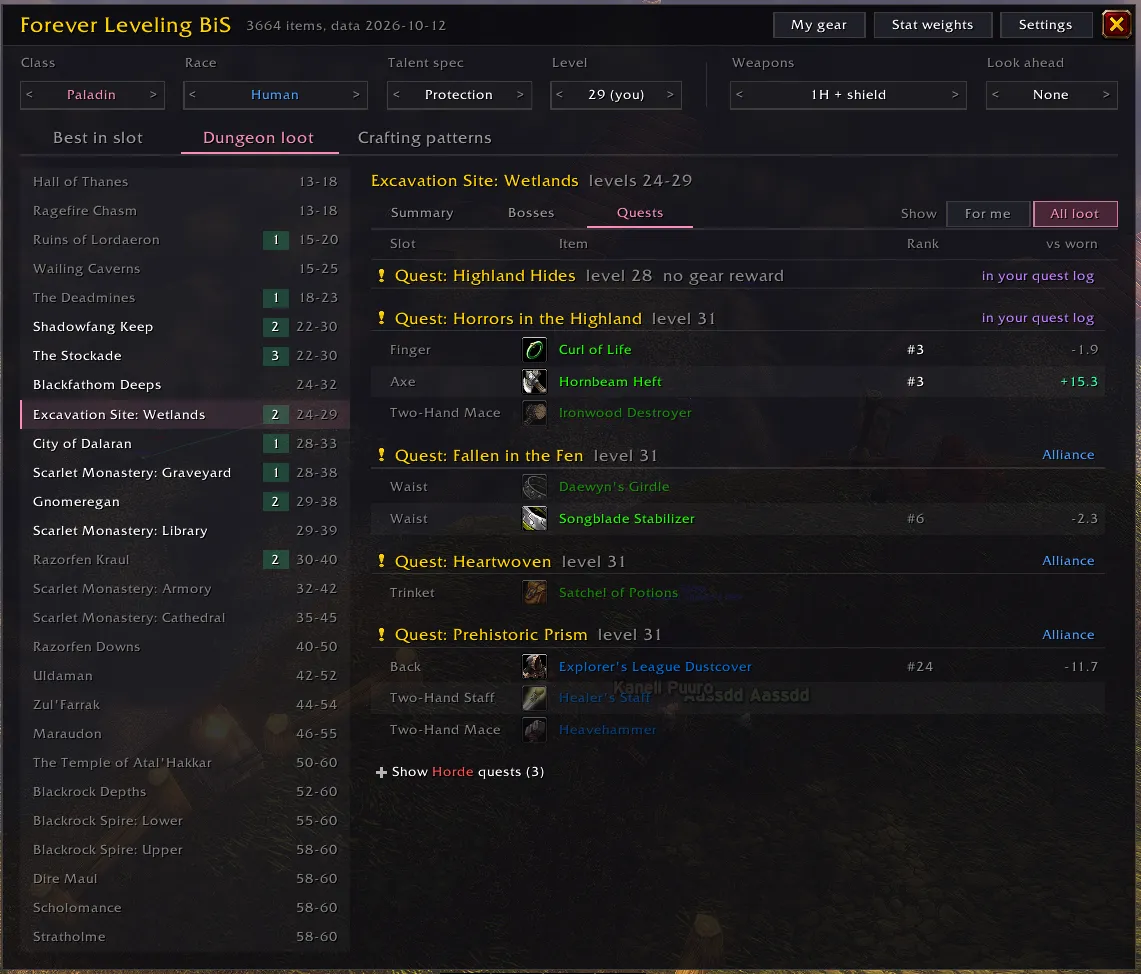
Item tooltip showing the gain over worn gear for the main spec and each off spec 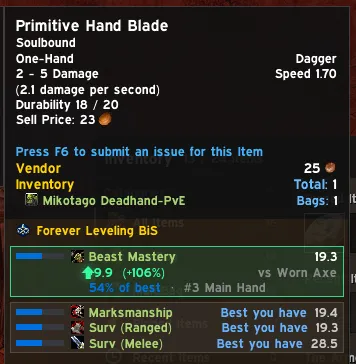
Getting started
- Type
/bisor click the minimap button. - Pick your Talent spec at the top. WoW: Forever can't detect it yet.
- Click a slot, and turn on My gear to compare with what you wear.
Good to know
- Stat weights are estimates from a leveling model, and you can edit them in game.
- Some new Forever dungeons have no published loot tables yet. They'll come in updates.
- Crafting patterns from other vendors, world drops, quests and raids aren't listed.
WoW: Forever is in beta, and so is this addon. Spot a wrong ranking or a missing item? Leave a comment on CurseForge with your class, spec and level, and the item's name and where it comes from.
What's new in 0.18.0
- Bag upgrades: every item in your bags that is an upgrade for your main spec gets a small green up arrow in its top right corner, bobbing gently. It marks exactly the items whose tooltip box turns green. It works in the game's own bags, in EllesmereUI bags (the bank too) and in Baganator, where you can move it to another corner under Icon Corners. Turn it off with the new Bag upgrades switch in Settings. With your main spec compared with Worn + bags, your bag items already count as gear you have, so none of them gets an arrow.
- Item tooltips: an upgrade's green box no longer flashes three times. It turns green and stays, and the arrow next to the gain still bobs.
0.17.0
- Item tooltips: when an item is an upgrade for your main spec, its box turns green and flashes three times, and the up arrow next to the gain bobs on a soft green glow. The main spec's box is laid out in two columns, icons under the spec icon and text under the spec name, so "#3 Main Hand" now sits with the rest of the text.
- Weapons: a better one-hander is an upgrade over the one you wear for every spec, including hunters, Arms and Fury warriors before Dual Wield, and Retribution paladins. A level 5 hunter holding an axe used to see "Not for Two-hander" on the Primitive Hatchet from Vile Familiars.
- Weapon skills: below level 10, only the weapon types your race and class start with count, plus any you've learned since. From level 10, every type your class can train counts (Polearms from 20). A level 5 Orc hunter's Primitive Walking Stick says Usable at level 10 and isn't the quest's best pick until you learn Staves. Gear you can only use later shows its score and that level, with no gain.
- Gear none of your spec's setups uses is compared with what you wear in a setup your class can hold: a shield for an Arms warrior is a loss next to a two-hander and an upgrade next to a lone one-hander. Off-hand weapons say Can't equip for classes that never dual wield, and Usable at level 20 (rogues 10) before Dual Wield.
- Miscellaneous weapons such as the Skinning Knife count for every class. A hunter's Skinning Knife used to say Can't equip.
- Class and race limits now come from the game itself, not from Wowhead, which copies a quest's limits onto its rewards: over 1,100 items lose a wrong limit. The Primitive Hand Blade and Primitive Walking Stick from Vile Familiars are no longer warlock only, and Alliance quest daggers no longer say Other races only. Quest rewards still follow the quest's own limits, so a warlock quest's reward is still only suggested to warlocks.
- Quest rewards: in a quest giver's window, the best pick's green outline and the upgrade mark in the right column are no longer cut off at the edge. Once you click the best pick, the game's gold highlight frames it instead of the green outline.
- The item count and data date in the title bar moved into a bubble that shows when you hover the title.
0.16.0
- Equip best: a new button on the My gear title bar puts on the best of what you carry for your main spec, in every slot where it beats what you wear (not in combat). Hover it to see each swap with its gain, a two-hander that needs a free bag slot first, and upgrades left out because they bind when equipped. Trinkets are left alone.
- My gear: when what you wear beats the Equipment Manager set your main spec is compared with, the title bar says Better than and the set's name, with a Save button that saves your gear to the set (slots the set ignores stay ignored). It used to say Not wearing and offer Wear, which undid Equip best. Right after Equip best, a question under Save offers to save straight away.
- Item tooltips: an off spec's row now says Best you have, In and the set's name, or Equipped when the item is already part of its gear, instead of showing a green check mark.
- Stat weights now assume the gear a normal player has at each level: quest rewards, dungeon drops with a 10% or better chance, and your class's own armor crafts, instead of the very best item for each slot. Casters and hybrids low on mana cast cheaper spells instead of stopping to drink when that's faster. The biggest changes:
- Stamina is worth much more at levels 1–9 for melee classes and hunters.
- Hit counts again at level 60 for Retribution, Enhancement, Arms and hunters. The old model assumed you were already at the hit cap.
- Intellect is worth more for low-level healers, most of all for Holy paladins and Restoration shamans at levels 1–9.
- My gear: a best-in-slot row's glow pulses three times when a new best-in-slot item goes on, then stays lit instead of pulsing all the time. The tier color fades out before the item name, so blue item names are easy to read.
- Best in slot: section headers are white, so they no longer look like the item and quest names under them. Equipped marks best-in-slot items in orange by the same rule as My gear (within 3% of the best).
- New look: the window's close button is a flat cross that lights up in your accent color. My gear, Stat weights and Settings stay lit while their panel is open, and the panels beside the window share its title band. The Stat weights boxes are flat, with the weights right-aligned.
- Less text: the Equipped header is just "Equipped" and quest rows drop "Quest:". Dungeon loot has no column headers, so the list shows one more line. In its Quests view, "in your quest log" is now "in log", the faction shows only on the other faction's quests, and your quests without gear rewards fold behind one line. Crafting patterns drops the pattern counts on its headers and the "Showing x of y patterns" line.
- Fixed a Lua error ("a secret number value") when hovering a bag item in a dungeon or in combat.
Data from Wowhead's WoW: Forever database, checked against the game client.

